
What Is Process Lasso Anti-Cheat Compatibility?
Process Lasso anti-cheat compatibility defines the operational boundary between system optimization software and kernel-level game protection systems. Modern competitive multiplayer titles deploy sophisticated anti-cheat software to monitor system memory, detect unauthorized modifications, and prevent external manipulation of game executables.
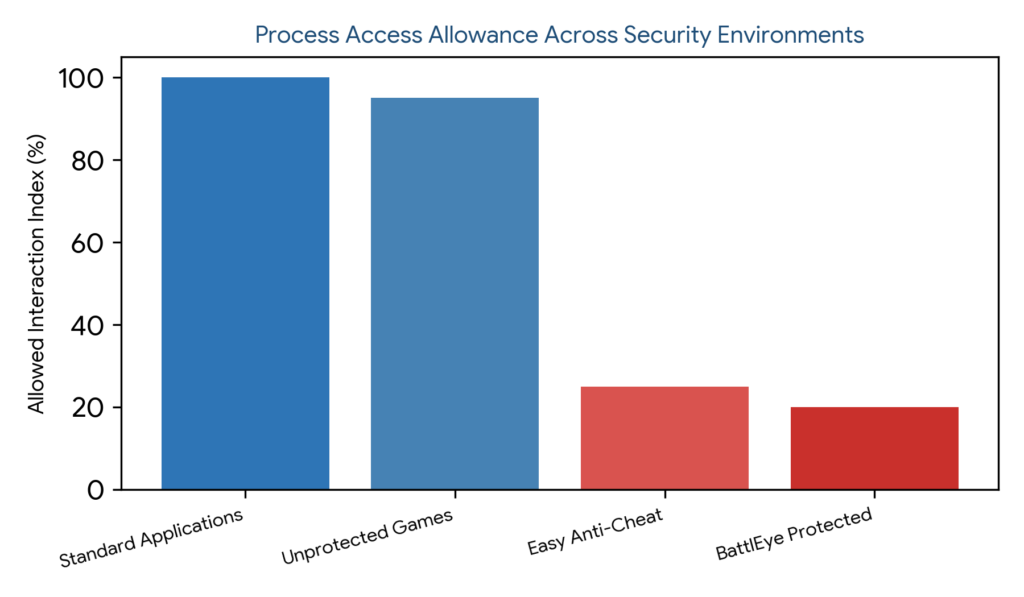
Understanding this compatibility framework clarifies why Process Lasso may not always apply configuration changes to protected games. While normal Windows applications and unprotected games allow unrestricted priority adjustments and core affinity assignments, anti-cheat protected environments enforce strict access control boundaries that block external write requests to safeguard competitive integrity.
How Process Lasso Works With Anti-Cheat Protected Games
The interaction between Process Lasso and anti-cheat protected games relies on the background governor service (`processgovernor.exe`) attempting to communicate through standard Windows NT executive APIs. When a protected game launches, the underlying anti-cheat driver intercepts open-handle requests and process access queries.
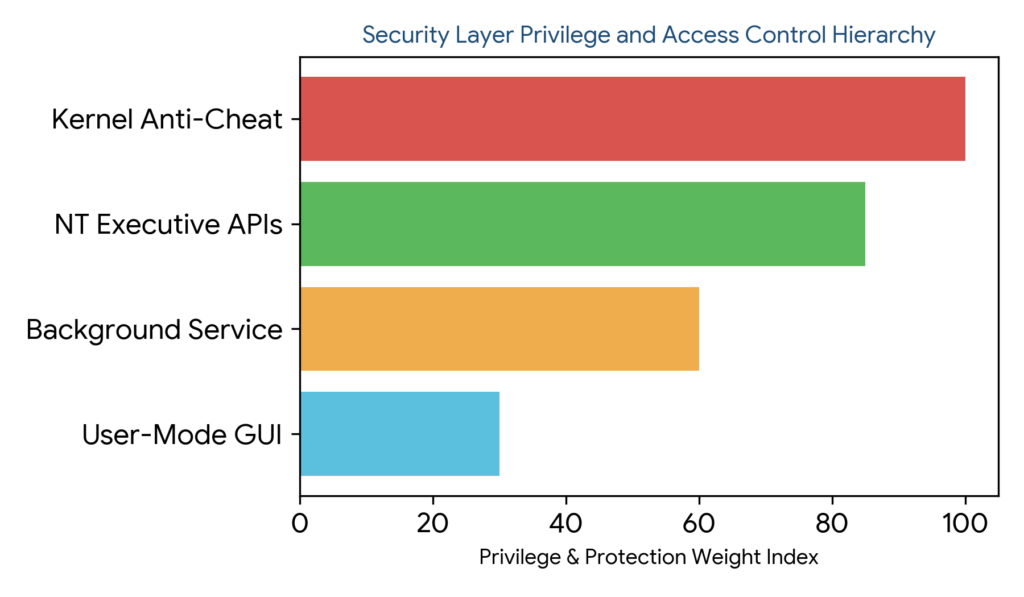
Because security layers operate with higher privilege levels in kernel mode, they frequently deny standard user-mode or system-level modification requests from external utilities. This security enforcement prevents Process Lasso from altering thread priority classes or core affinity masks for protected game processes, ensuring that game protection systems remain untampered.
Why Anti-Cheat Systems Restrict Process Management
Anti-cheat systems restrict process management to prevent malicious actors from injecting code, altering memory addresses, or manipulating game execution timing. Competitive gaming ecosystems require robust isolation to block external exploits and memory scanning tools.
Consequently, legitimate optimization utilities like Process Lasso are often caught within the same broad security restrictions. By blocking unauthorized handle acquisition and handle duplication, anti-cheat drivers ensure that no external software can interfere with protected process memory spaces.
Process Lasso Protected Process Support and Limitations
Protected process support within Process Lasso is intentionally constrained by operating system security boundaries and third-party anti-cheat rules. While the background service can monitor CPU utilization and log process creation events for telemetry purposes, active modifications are frequently restricted.
Administrators must recognize that these limitations originate from game security drivers rather than software bugs. Attempting to force priority overrides or affinity changes on heavily protected titles typically results in access denied errors or automated game closures.
Understanding Process Lasso Game Protection Compatibility
Navigating game protection compatibility requires aligning user expectations with modern security realities. Process Lasso remains fully effective for general system optimization, background process throttling, and managing unprotected applications, but users must respect the operational boundaries enforced by anti-cheat frameworks.
Common Process Lasso Anti-Cheat Issues
Users configuring Process Lasso alongside modern multiplayer games frequently encounter specific operational hurdles. Recognizing these common symptoms helps administrators differentiate between standard configuration errors and anti-cheat security restrictions.
Common manifestations include access denied pop-ups, unresponsive rule applications, and failure to modify CPU affinities for specific game executables. Identifying the root cause ensures that operators do not waste time troubleshooting non-existent software malfunctions.
Process Lasso Access Denied Errors With Protected Games
Access denied errors occur when Process Lasso attempts to open a handle to a protected game process with insufficient permissions or when kernel-level security drivers explicitly block the handle request. These errors reflect standard Windows security enforcement designed to protect sensitive runtime environments.
Process Lasso Cannot Modify Protected Processes
The inability to modify protected processes stems from anti-cheat handle stripping mechanisms. When security software strips process access rights, even elevated system-level services are prevented from writing priority or affinity modifications into the target process block.
Process Lasso Settings Not Applying to Games
When saved settings fail to take effect on specific games, compatibility limitations or anti-cheat blocking policies are usually responsible. Verifying whether the target game runs under an active protection layer helps isolate whether process rules are being suppressed by security drivers.
Process Lasso Unable to Change Game Priority or CPU Affinity
Failing to change game priority or CPU affinity for protected titles is a direct consequence of anti-cheat access blocking. While CPU affinity management falls under broader core allocation rules, security drivers intercept and discard these requests to prevent execution timing manipulation.
Process Lasso Easy Anti-Cheat Compatibility
Easy Anti-Cheat (EAC) is a widely adopted security solution designed to safeguard multiplayer games against unauthorized modifications and memory tampering. Understanding how EAC interacts with system optimization tools is essential for maintaining a stable gaming setup.
How Easy Anti-Cheat Blocks Process Lasso Changes
Easy Anti-Cheat deploys a kernel-mode driver that monitors system activity and strips process handle privileges for protected game titles. When Process Lasso attempts to adjust thread priorities or apply affinity rules, the EAC driver detects the handle query and rejects the modification request
Using Process Lasso With Easy Anti-Cheat Protected Games
Safe usage of Process Lasso alongside EAC-protected games involves utilizing non-intrusive background monitoring while avoiding forced process rule injections. Users should allow Process Lasso to optimize background operating system tasks while exempting protected game executables from aggressive rules.
Troubleshooting Process Lasso EAC Issues
Troubleshooting EAC-related conflicts requires verifying that Process Lasso is running standard non-destructive configurations. If game startup errors occur, operators should review exclusion settings and ensure no conflicting automation rules target protected game binaries.
Easy Anti-Cheat (EAC) is a widely adopted security solution designed to safeguard multiplayer games against unauthorized modifications and memory tampering. Understanding how EAC interacts with system optimization tools is essential for maintaining a stable gaming setup. Learn more from Easy Anti-Cheat Official Website .| Process Environment | Handle Access Level | Priority Modification | Affinity / CPU Set Control |
|---|---|---|---|
| Standard Apps | Full Access (PROCESS_ALL_ACCESS) | Fully Supported | Fully Supported |
| Unprotected Games | Standard User/System Access | Fully Supported | Fully Supported |
| Easy Anti-Cheat | Stripped / Restricted Access | Blocked by Driver | Blocked by Driver |
| BattlEye Protected | Kernel-Level Handle Denial | Blocked by Driver | Blocked by Driver |
Process Lasso BattlEye Compatibility
BattlEye is another prominent kernel-level anti-cheat system utilized by major online multiplayer titles to prevent cheating and unauthorized external software interaction. Its aggressive security model significantly impacts how background utilities interact with game processes.
How BattlEye Affects Process Lasso Process Management BattlEye operates via a dedicated kernel driver that blocks unauthorized process handle creation and monitors system thread allocations. When Process Lasso attempts to manage or prioritize a BattlEye-protected game, the driver intercepts the request and returns access denied exceptions.
Using Process Lasso With BattlEye Protected Games Operators should refrain from forcing optimization rules on BattlEye-protected titles. Instead, users can rely on Process Lasso to optimize background operating system processes, ensuring maximum available system resources are dedicated to the game without triggering anti-cheat alarms.
Fixing BattlEye Blocking Process Lasso Issues Resolving BattlEye blocking issues involves ensuring that Process Lasso rules exclude protected game executables. Eliminating conflicting process rules prevents repeated access violations and ensures smooth multiplayer gameplay sessions.
Managing Protected Games With Process Lasso
Effective management of protected games requires adopting a balanced optimization strategy that respects system security boundaries while maintaining overall operating system responsiveness.
Process Lasso Protected Game Settings
Protected game settings should be restricted to non-intrusive monitoring and global system tuning. Attempting to apply aggressive process-specific tweaks to protected executables is counterproductive due to security driver interceptions.
Safe Process Management for Protected Games
Safe process management involves optimizing background background applications, web browsers, and chat clients rather than tampering with protected game binaries. This indirect optimization approach improves system performance safely.
Understanding Process Lasso Gaming Compatibility
Gaming compatibility varies significantly depending on whether a title utilizes third-party anti-cheat software. Understanding these distinctions helps users configure Process Lasso effectively for both competitive multiplayer games and standalone single-player titles.
Process Lasso Permissions and Security Restrictions
Operating system permissions and security layers dictate how background services interact with running processes. Understanding these permission hierarchies explains why administrative rights alone cannot bypass kernel anti-cheat blocks.
Process Lasso Administrator Permission Requirements
Administrator permissions are required during initial installation and service setup to register the background governor (`processgovernor.exe`) with the Windows Service Control Manager under the SYSTEM account. However, admin rights do not override kernel-level anti-cheat restrictions.
Using Elevated Permissions With Process Lasso
Running Process Lasso with elevated privileges ensures it can manage standard system processes and background utilities effectively. Nevertheless, operators must recognize that kernel anti-cheat drivers operate at a higher security tier than standard user-mode or system-level processes.
Understanding Process Access Limitations
Process access limitations are hard boundaries enforced by Windows NT security descriptors and third-party kernel drivers. Respecting these boundaries ensures system stability and prevents unintended software conflicts.
| Anti-Cheat System | Driver Architecture | Process Modification Support | Recommended Action |
|---|---|---|---|
| Easy Anti-Cheat (EAC) | Kernel-Level Driver | Blocked for Protected Binaries | Exclude game executable from rules |
| BattlEye | Kernel-Level Driver | Blocked for Protected Binaries | Optimize background apps only |
Safe Ways to Use Process Lasso With Anti-Cheat Systems
Adopting safe usage practices ensures that Process Lasso enhances system performance without triggering security flags or game crashes. Focusing on background optimization provides the best performance gains safely.
Avoiding Conflicts With
Game Protection Systems
Preventing compatibility conflicts involves creating explicit exclusions for protected game titles within Process Lasso rules. This proactive measure prevents unnecessary handle access attempts and eliminates error logs.
Checking Process Lasso
Compatibility Before
Changing Settings
Testing system compatibility before enforcing aggressive rules helps identify protected processes. Observing how the background governor interacts with newly launched software ensures stable operation.
Managing Supported Games
Without Triggering
Restrictions
Focusing optimization efforts on non-protected applications, emulation software, and productivity tools allows users to harness Process Lasso’s full feature set without running afoul of strict anti-cheat policies.
Troubleshooting Process Lasso Anti-Cheat Problems
Resolving anti-cheat compatibility issues requires a structured troubleshooting methodology. Identifying conflicting rules and verifying permission boundaries helps restore smooth system operation.
Why Anti-Cheat Blocks Process Lasso
Anti-cheat software blocks external utilities as a standard security precaution to protect game memory integrity. Understanding this protective intent helps users interpret error messages correctly.
Fixing Process Lasso Anti-Cheat Errors
Fixing compatibility errors typically involves removing process-specific rules targeting protected games, restarting the background governor service, and verifying that no unauthorized modifications are attempted.
Steps to Resolve Process Lasso Compatibility Issues
Resolving compatibility issues involves identifying the active anti-cheat system, reviewing active process rules, applying appropriate exclusions, and verifying normal application behavior during gameplay.